Hazmat incident simulation

From Dispatch
to Scene Control.

An interactive walkthrough of a high-risk chlorine release, demonstrating how FireHazmat supports every critical decision from the moment tones drop — built on the complete ERG 2024 dataset, running 100% offline on the rig.

3,541 materials · 62 response guides · 272 isolation distances · 26 Table 3 entries · zero network required

Begin scenario
The problem FireHazmat solves

30,000+ hazmat incidents a year. Every one of them, the same first three minutes.

First responders arrive to unknown substances, damaged placards, and zero connectivity — armed with a 400-page paper guidebook that takes minutes to navigate under stress. FireHazmat replaces that paper ERG with a purpose-built digital command tool. What follows is a real scenario. Every screen below is from the live app.

1
Dispatch

Tones Drop — Hazmat Alarm

T+00:00 · 14:32 HRS
DISPATCH

"Engine 7, Hazmat 1 — respond to Industrial Boulevard and Route 17. Chemical release at a commercial chemical supply facility. Caller reports strong chlorine-like odor, employees evacuating the building. Multiple victims symptomatic. Wind southwest at 12 miles per hour. Time out 14:32."

The tones hit. Your crew is moving before the repeat. As the hazmat technician on your department's team, you know what a chlorine release means — this is a Toxic Inhalation Hazard.

Before the apparatus clears the bay, you open FireHazmat on the rig-mounted iPad. The app launches instantly. No loading spinner, no login, no server connection. The complete ERG 2024 dataset is already on-device:

  • 3,541 materials searchable by name, UN number, or CAS number
  • 62 ERG response guides with full unabridged text — every section, every bullet
  • 272 Table 1 isolation distances (small & large spill, day & night)
  • 26 Table 3 container-specific distances for the 7 most dangerous TIH substances
  • Zero network dependency — works in tunnels, basements, rural highways, dead zones
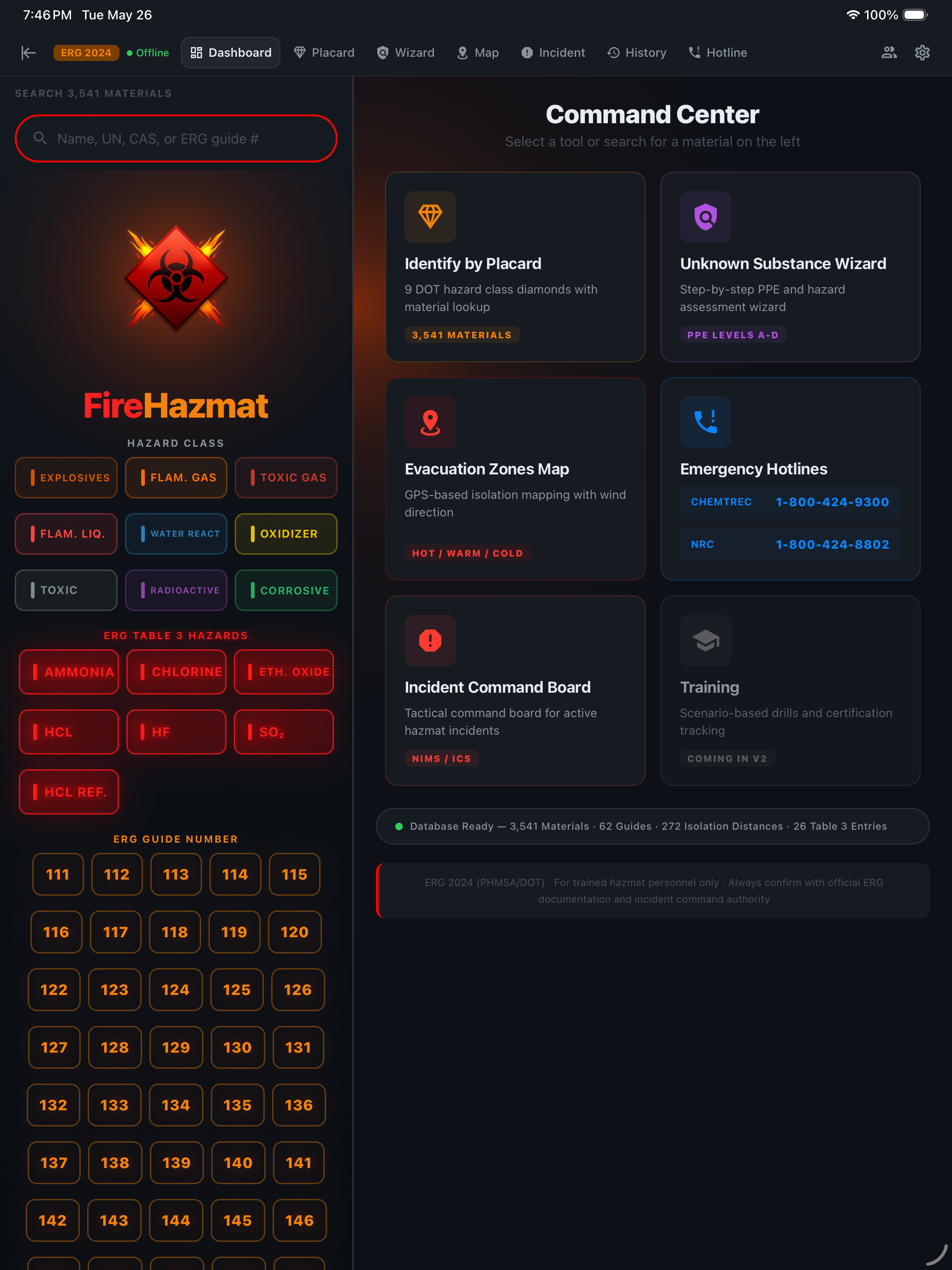
iPad Command Center home — the six tactical tools at a glance
2
En Route

Chlorine — Know Your Enemy

T+01:30 · 14:33 HRS

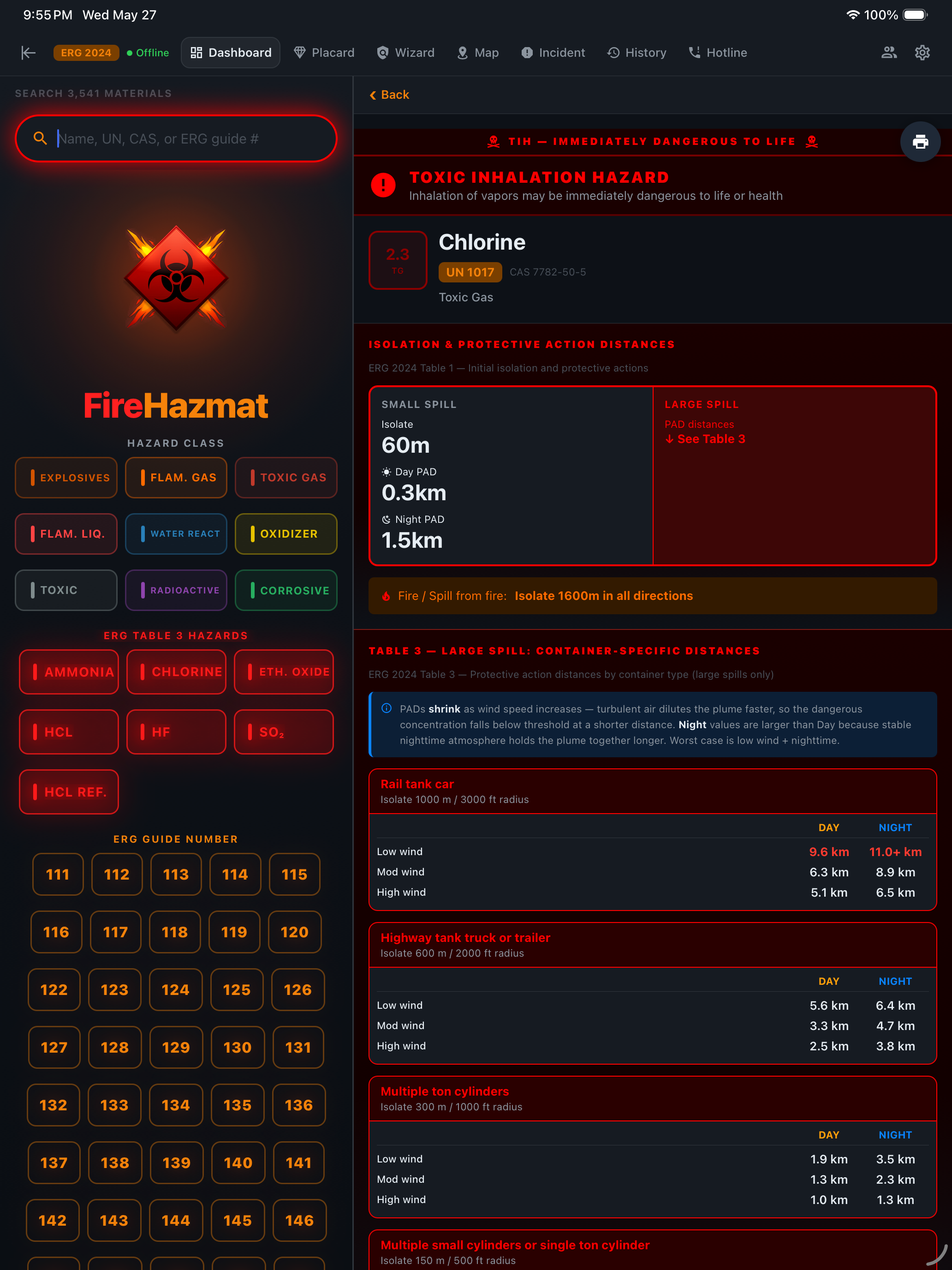
Dispatch said chlorine-like odor. You type "chlorine" into the search bar. Results appear in under 100 milliseconds. You tap Chlorine — UN 1017, Guide 124.

The detail screen gives you the complete threat picture in a single view:

  • TIH — Toxic Inhalation Hazard (red banner, flagged immediately)
  • TOXIC and/or CORROSIVE — may be fatal if inhaled or absorbed through skin
  • Vapors heavier than air — spread along ground, collect in sewers, basements, tanks
  • Strong oxidizer — reacts vigorously or explosively with fuels
  • Cylinders exposed to fire may vent toxic gas; containers may explode when heated

Table 3 — Container-Specific Isolation (Large Spill)

Chlorine is one of only 7 Table 3 substances in the ERG — too dangerous for a single isolation number:

ContainerIsolateDay ProtectNight Protect
Rail tank car3,000 ft5.1–9.6 km6.5–11.0+ km
Highway tank truck2,000 ft2.5–5.6 km3.8–6.4 km
Multiple ton cylinders1,000 ft1.0–1.9 km1.3–3.5 km
Single ton cylinder500 ft0.5–1.3 km0.6–2.4 km

No other app puts Table 1 and Table 3 data on a single material detail screen. No flipping pages. No cross-referencing appendices. One tap. Complete picture.

iPad material detail — Chlorine UN 1017 with Toxic Inhalation Hazard banner, Initial Isolation 60 m plus Day PAD 0.3 km and Night PAD 1.5 km, and Table 3 large-spill container-specific PAD distances by Day/Night and Low/Mod/High wind for Rail tank car, Highway tank truck, and Multiple ton cylinders
3
On Scene

Placard Identification

T+06:00 · 14:38 HRS

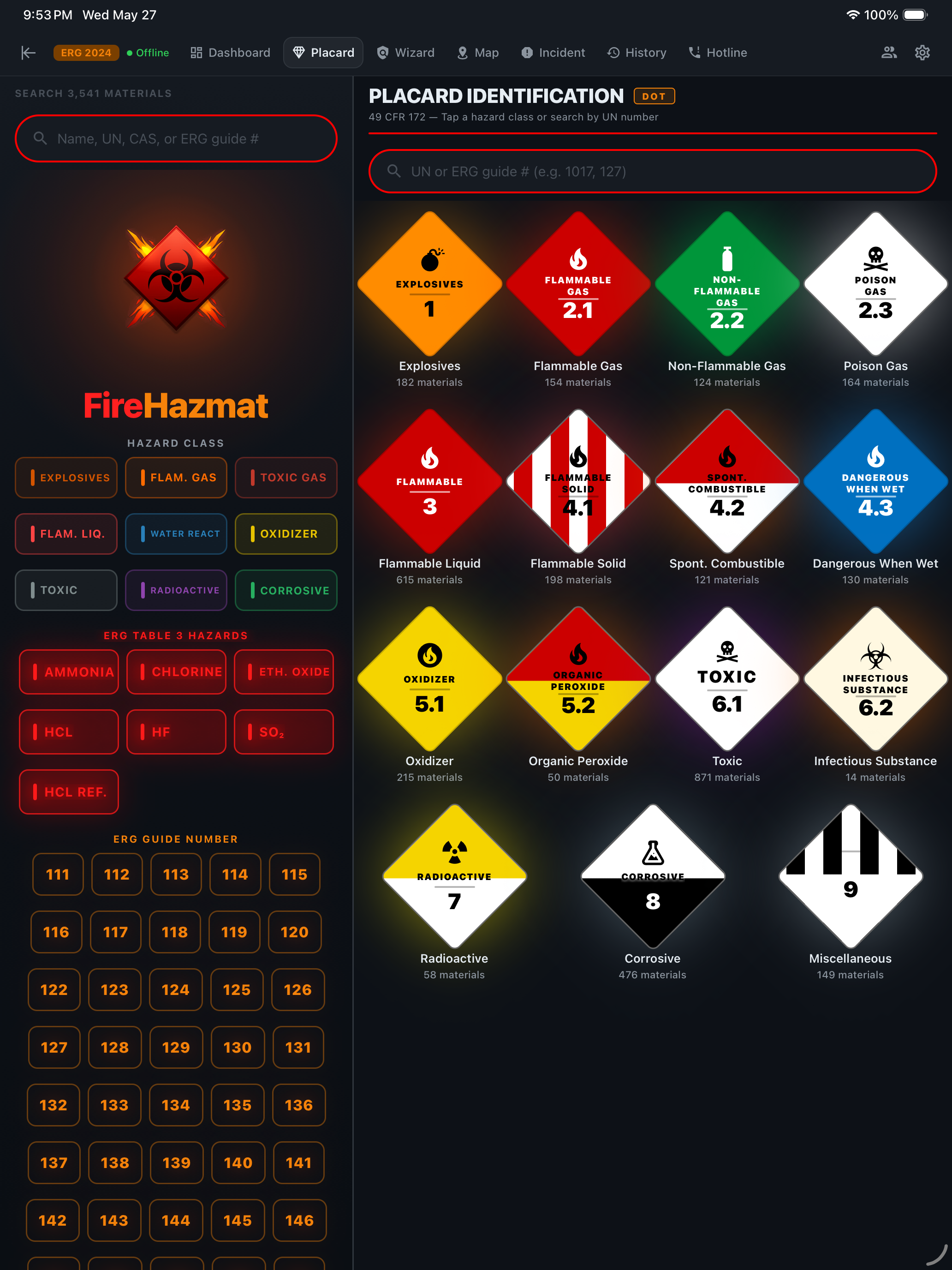
You arrive and establish command upwind at the 1,000-foot perimeter. Through binoculars, you can see a damaged container with a partially obscured placard. The UN number is unreadable, but you can make out the hazard class diamond — shape and color.

You switch to the Placard tab. All 9 DOT hazard class diamonds are displayed exactly as they appear on containers, tank trucks, and rail cars — the same visual language every responder is trained on.

Match the diamond. One tap. You're looking at every material in that class, ready to cross-reference with any shipping papers or facility records you can get your hands on.

  • Placards get damaged, melted, obscured by fire and debris
  • The hazard class diamond is the most durable identifier on any container
  • Paper ERG: flip to a separate placard page, then cross-reference — 30+ seconds under stress
  • FireHazmat: one tap, instant filter across 3,541 materials
iPad Placard Identification — all 9 DOT hazard class diamonds in real placard colors with material counts
4
Critical Decision

Unknown Substance Wizard

T+08:00 · 14:40 HRS

A second container has ruptured. No placard. No shipping papers. No markings. Vapor is spreading downwind. You are dealing with a completely unknown substance.

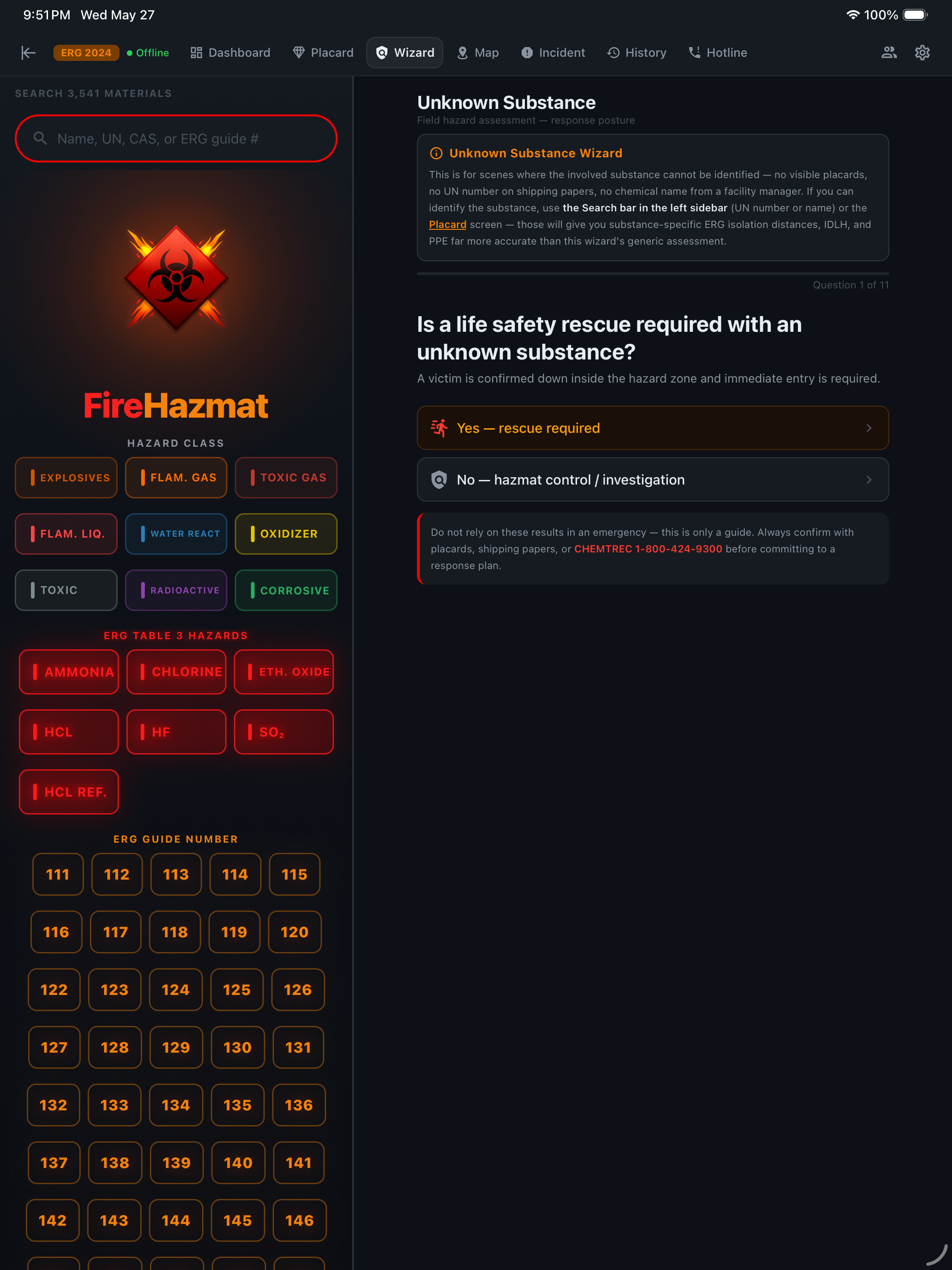
This is the scenario the Wizard was built for. You open the Wizard tab and face the single most important question in hazmat response.

iPad Wizard Question 1 — Is a life safety rescue required with an unknown substance?

Three paths. Three completely different command postures.

The wizard opens with two bifurcation gates. Yes on either short-circuits to a posture-specific result. No on both unlocks the 9 hazard-class indicators that build the cumulative threat profile.

🚨 Path A — Life Safety Rescue

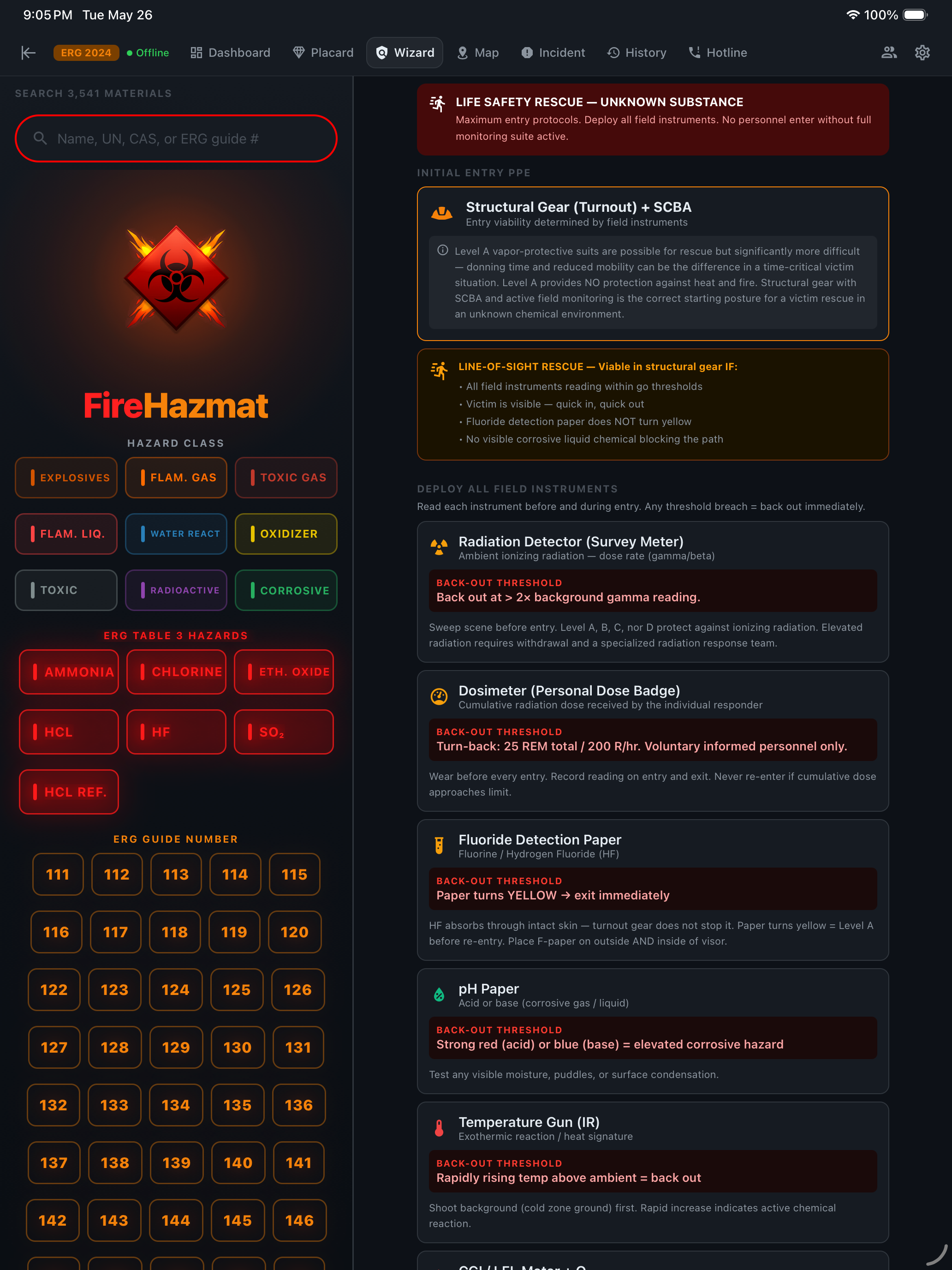
Q1 = Yes. A victim is confirmed down inside the hazard zone and immediate entry is required. The most dangerous operation in hazmat response.

iPad Wizard rescue path result — Structural Gear plus SCBA initial entry PPE with line-of-sight rescue rules and full field-instrument deployment with back-out thresholds
  • PPE: Structural firefighting gear + SCBA (minimum for unknown atmosphere)
  • Approach: Uphill and upwind — never enter from the downwind/downhill side
  • Rescue criteria: Line-of-sight only — victim must be visible from entry point
  • Time limit: Grab-and-go extraction — no prolonged search in unknown atmosphere
  • Field instruments: Active monitoring with specific back-out thresholds
  • Backup team: Suited and staged at entry point, ready for immediate deployment

💥 Path B — Explosion / BLEVE Standoff

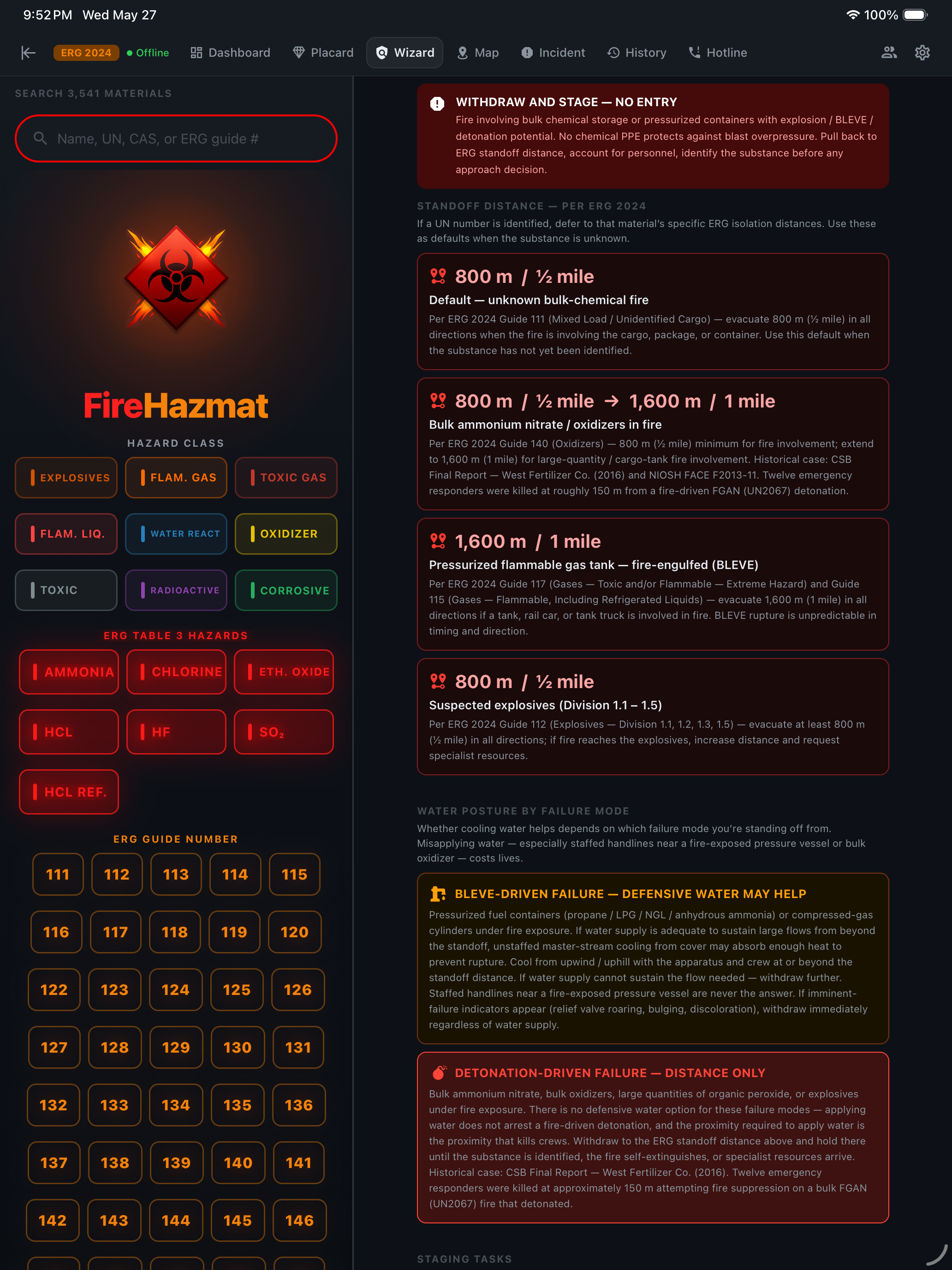
Q1 = No, Q2 = Yes. Credible bulk or mass-explosion / detonation risk from the materials in or near this fire. No chemical PPE protects against blast overpressure. The right answer is not suit selection — it’s distance.

iPad Wizard standoff path — Withdraw and Stage NO ENTRY banner with ERG 2024 standoff distances per failure mode: 800 m default unidentified bulk-chemical fire, 1600 m bulk ammonium nitrate, 1600 m pressurized fuel-gas tank BLEVE, and water-supply guidance for BLEVE-driven vs detonation-driven failure
  • Posture: Withdraw and stage — no entry until the substance is identified from cover
  • Distances: ERG 2024 standoff cards by failure mode (800 m default, 1,600 m bulk ammonium / BLEVE, suspect-explosives tables)
  • Identification: Binoculars, drone, facility manager, pre-incident plan, shipping papers obtained at distance
  • PAR: Account for every responder — reposition any unit inside the radius before continuing operations
  • Water supply: Sustained supply staged beyond the standoff; defensive streams from cover only if the supply can sustain them
  • Brief incoming units: Pass standoff + staging + suspected hazard before they cross the perimeter

🛡️ Path C — Hazmat Assessment & Entry

Q1 = No, Q2 = No. No confirmed victims in the hot zone, no mass-explosion risk. Run the full 9-indicator assessment to determine substance class, PPE level, and field-instrument package.

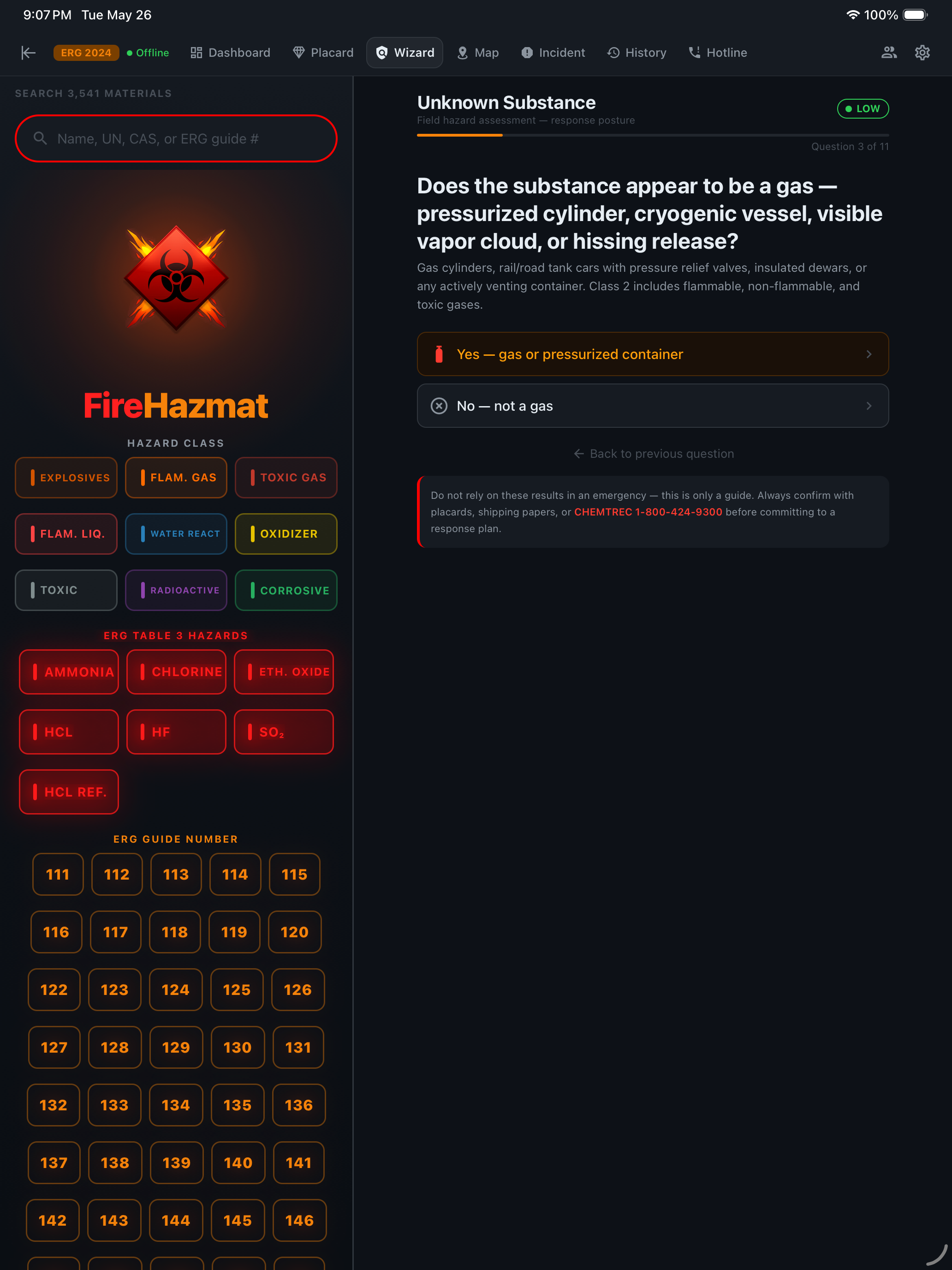
iPad Wizard first hazard-class indicator — Does the substance appear to be a gas, pressurized cylinder, cryogenic vessel, visible vapor cloud, or hissing release? — with LOW risk badge as the assessment begins
  • Gases: Pressurized cylinder, cryogenic vessel, vapor cloud, hissing?
  • Flammable liquid: Pooling, flowing, or producing flammable vapors?
  • Flammable solid: Self-igniting, smoldering, heat without external source?
  • Water reactive: Violent reaction, steam, bubbling on contact with moisture?
  • Oxidizer: Accelerating fire, intense white/yellow flames, or self-reactive material?
  • Toxic, radiation, corrosive, confined space — 9 indicators total, stacking into Level A/B/C PPE
5
Risk Escalation

The Wizard Adapts in Real Time

T+10:00 · 14:42 HRS

On the standard assessment path, you work through the Wizard based on field observations. Each answer feeds into a dynamic risk model.

You start the assessment with the early questions. Pooling liquid visible beneath the container, faint fuel-like sheen — one positive answer in. Risk badge reads LOW.

You confirm flammable solid / spontaneous combustion (the smoldering edge of the container, heat radiating from the puddle). Multiple class indicators stacking. Badge climbs to HIGH.

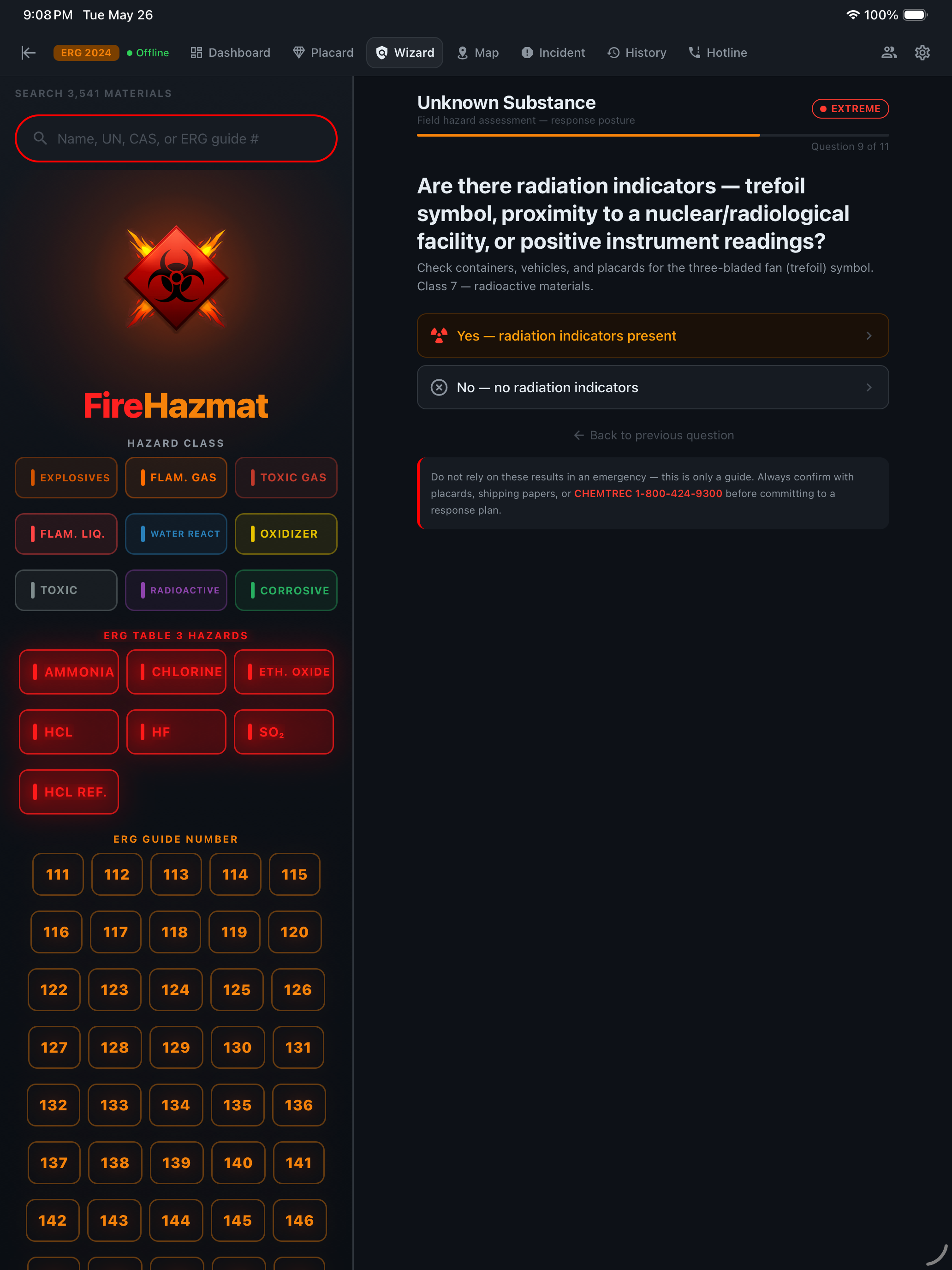
Then the trefoil. Class 7 indicators present — instrument readings above background, proximity to a known radiological facility. Badge escalates to EXTREME.

  • The Wizard builds a cumulative threat profile with every answer
  • The risk badge — visible at all times in the header — gives the IC an immediate, data-driven read on scene severity
  • No interpretation needed. No ambiguity. The answer changes as the assessment evolves.
iPad Wizard at the radiation question — risk badge has escalated to EXTREME after stacking class indicators
6
Action Plan

Complete PPE & Response Package

T+12:00 · 14:44 HRS

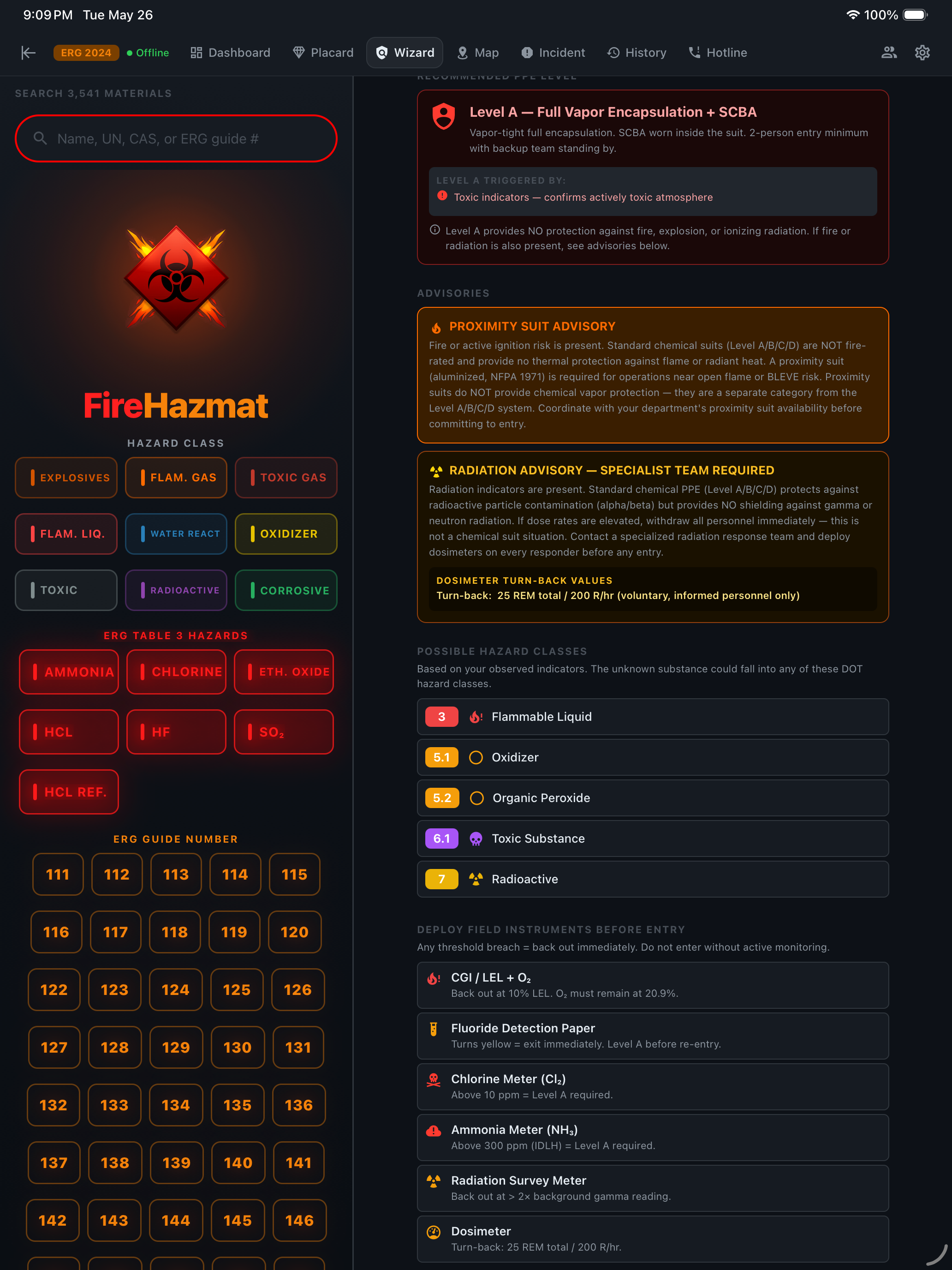
All 9 hazard-class indicators answered (after both bifurcation gates returned No). The Wizard delivers a complete response package — not just a PPE recommendation, but everything the entry team needs:

Level A — Full Vapor Encapsulation + SCBA

  • Vapor-tight fully encapsulating chemical protective suit
  • SCBA worn inside the suit
  • 2-person entry minimum with backup team standing by

Proximity Suit Advisory

Fire or active ignition risk present. Standard chemical suits (Level A/B/C/D) are NOT fire-rated. A proximity suit (aluminized, NFPA 1971) is required for operations near open flame or BLEVE risk.

Also Generated

  • Possible hazard classes — 3 Flammable Liquid, 4.1 Flammable Solid, 4.2 Spontaneously Combustible, 8 Corrosive
  • 6 field instruments to deploy before entry, each with specific back-out thresholds
  • Emergency contacts — one-tap CHEMTREC and NRC Hotline

From 11 field observations (2 gates + 9 indicators) to a complete, actionable response plan. Under 2 minutes. No internet required.

iPad Wizard final PPE Assessment — Level A Full Vapor Encapsulation plus SCBA, proximity suit advisory, and the eight possible hazard classes the indicators triggered
7
Evacuation

Zone Mapping — Visualize the Danger

T+14:00 · 14:46 HRS

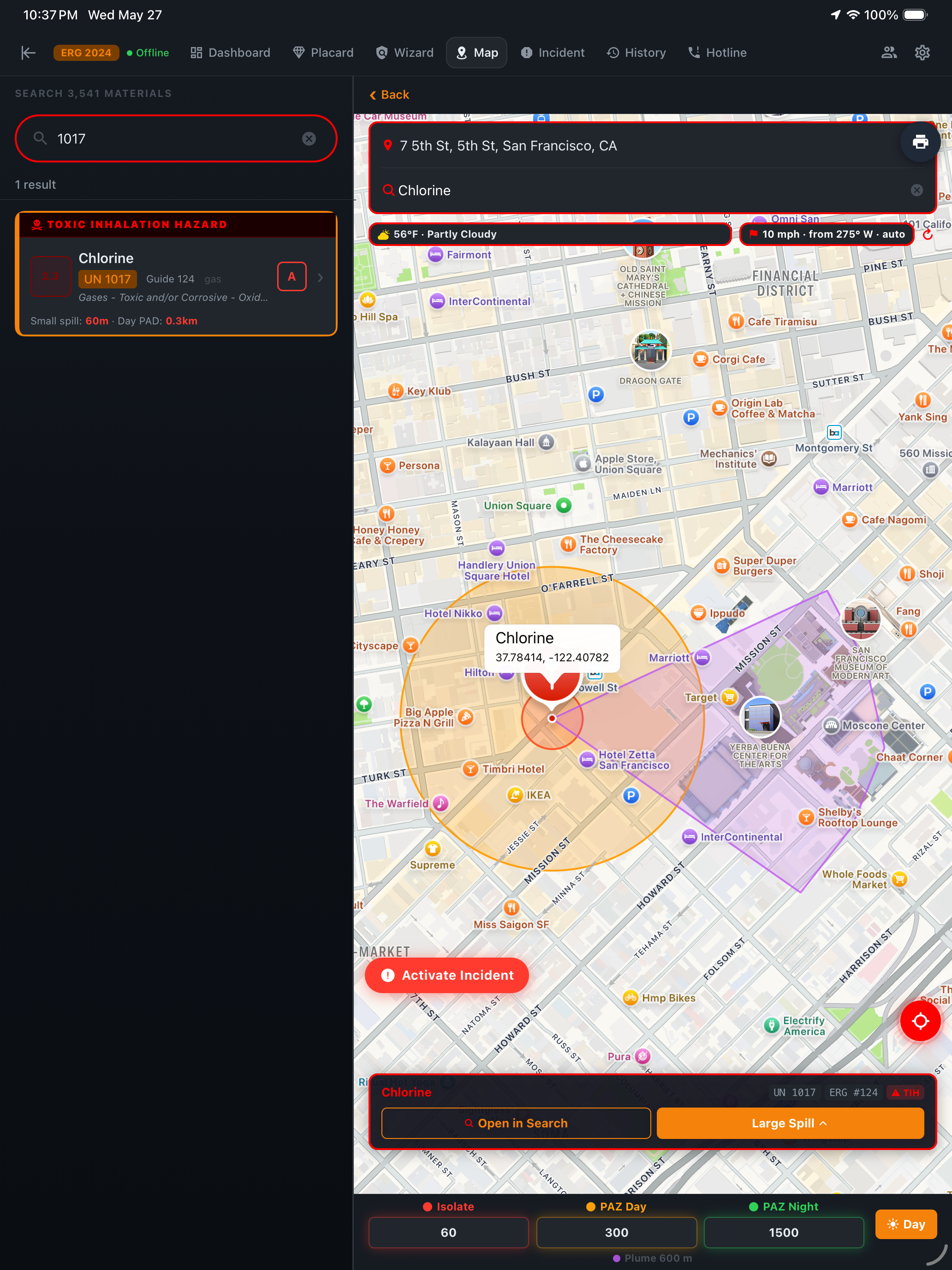
With substance identified and PPE confirmed, you need to establish and communicate evacuation zones to incoming units, law enforcement, and EMS staging. The Map tab uses your GPS location and the ERG isolation distances to render three concentric zones on a real-world map.

The map integrates wind direction and speed to model vapor plume dispersion — critical for chlorine, which is 2.5x heavier than air and will settle into low-lying areas downwind.

  • Hot Zone — immediate IDLH atmosphere
  • Warm Zone — decontamination corridor, controlled access, full PPE
  • Plume Spread Zone — protective action zone based on current weather and ERG Table 1 / Table 3 distances

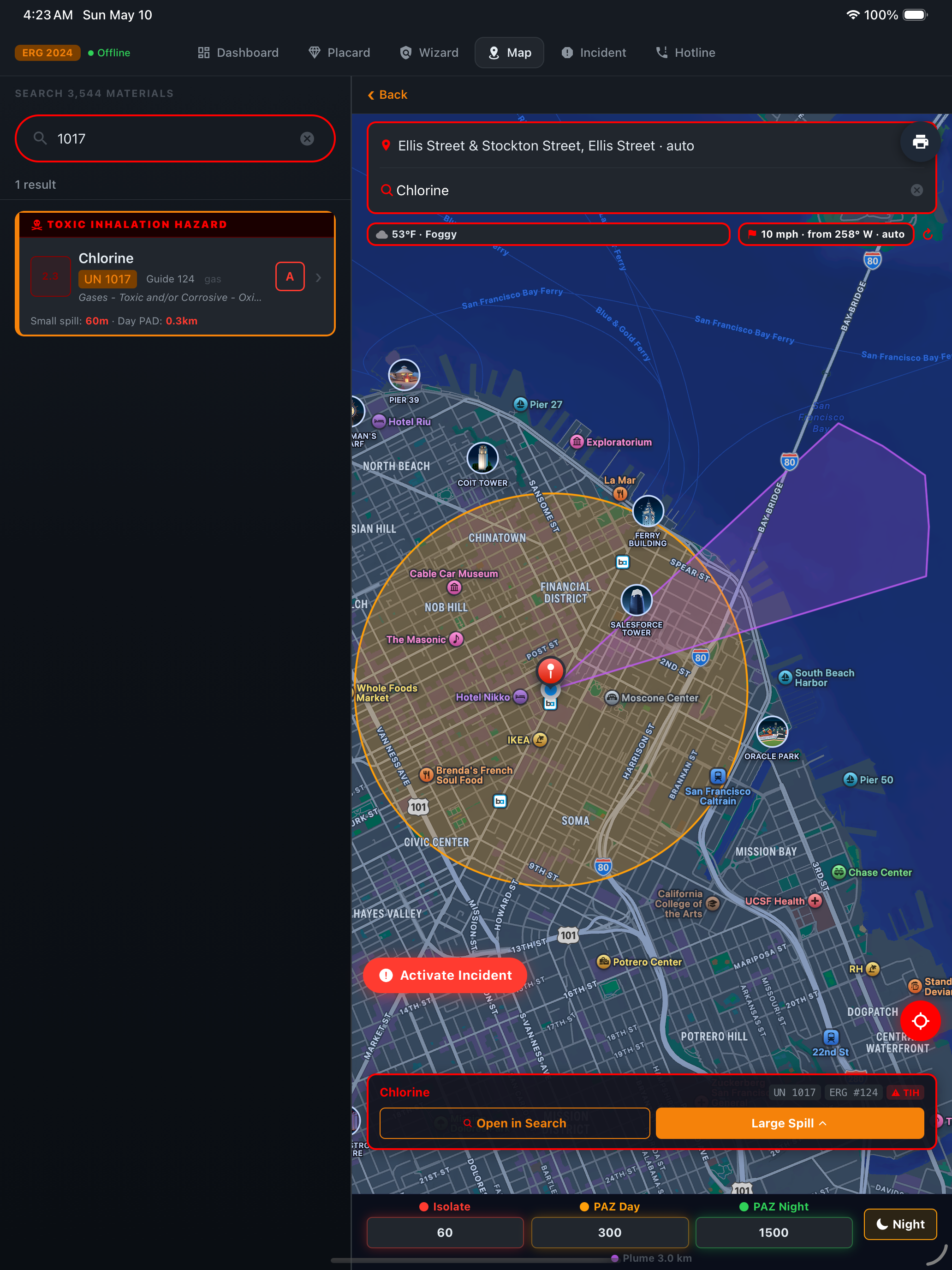
Day vs. night PADs are not the same. Atmospheric stability changes after dark; the Map auto-toggles based on incident location's civil twilight, with a manual override. The pair below shows the same Chlorine release, same wind — one in Day mode (300m PAD), one in Night mode (1,500m PAD).

iPad Map — Day PAZ at 300m for Chlorine release
DAY — 300m PAD  ·  NIGHT — 1,500m PAD
iPad Map — Night PAZ at 1500m for Chlorine release
8
Notifications

Emergency Contacts — Required Calls

T+16:00 · 14:48 HRS

Zones are established. Entry team is suited in Level A, approaching uphill and upwind. Now: required notifications.

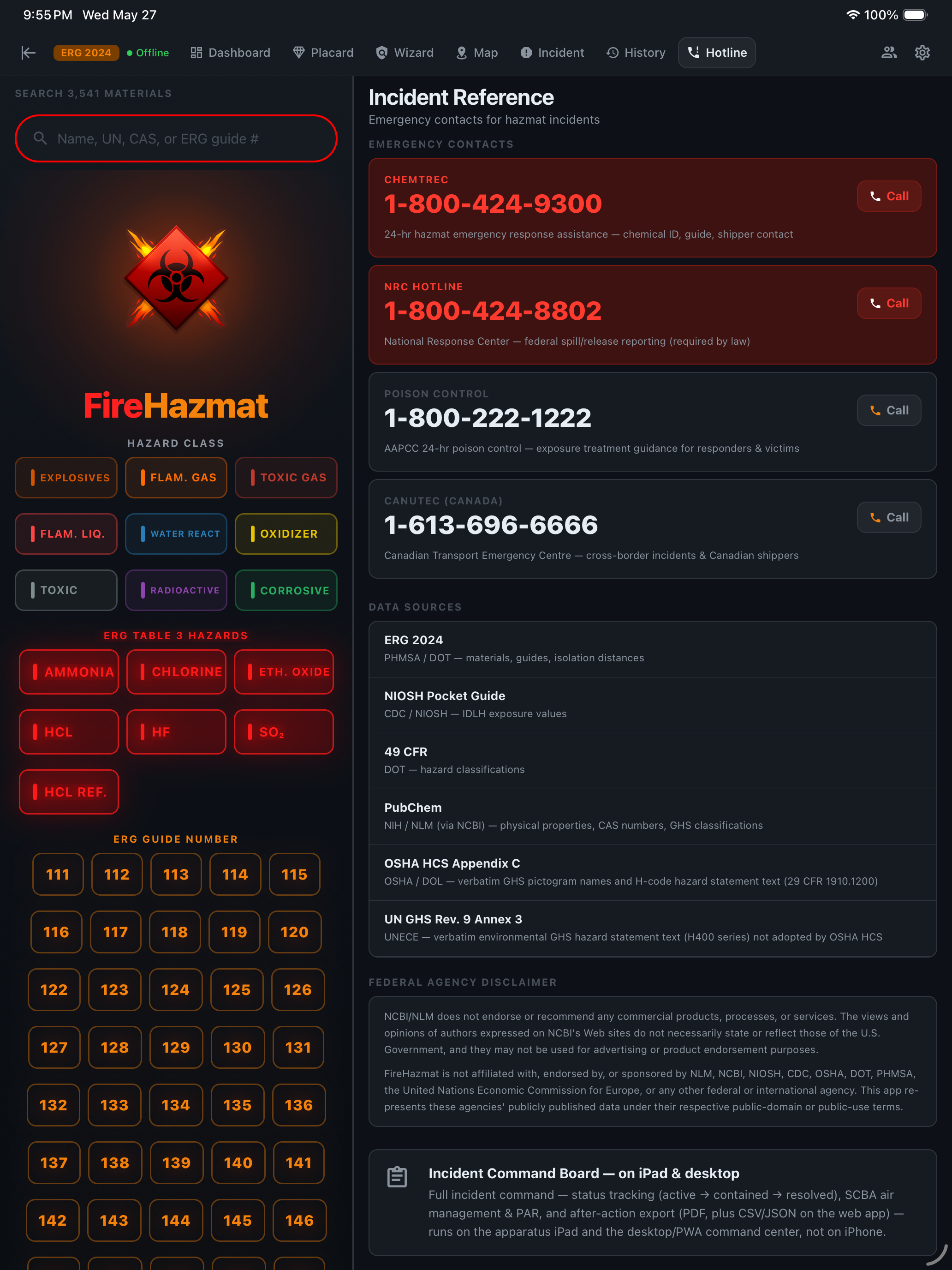
CHEMTREC

1-800-424-9300

24-hour hazmat emergency response. Chemical identification, ERG guide verification, shipper contact, product-specific response guidance. The first call in every significant hazmat incident.

National Response Center

1-800-424-8802

Federal spill/release reporting. Required by law under CERCLA §103 for any release exceeding reportable quantities. Chlorine RQ: 10 lbs.

Poison Control

1-800-222-1222

AAPCC 24-hour exposure treatment guidance for responders and civilian victims.

CANUTEC

1-613-696-6666

Canadian Transport Emergency Centre for cross-border incidents and Canadian shippers.

Every number has a one-tap call button and a clipboard copy option. On a hazmat scene, fumbling through contacts or Googling phone numbers is not an option.

iPad Incident Reference tab — on-device emergency contacts CHEMTREC 1-800-424-9300, NRC Hotline 1-800-424-8802, Poison Control 1-800-222-1222, and CANUTEC Canada 1-613-696-6666, with cited data sources ERG 2024, NIOSH Pocket Guide, 49 CFR, PubChem, OSHA HCS Appendix C, and UN GHS Rev. 9 Annex 3
9
Tactical Command

Activate Incident — iPad Command Center

T+18:00 · 14:50 HRS

The iPad mounted in the hazmat apparatus runs FireHazmat in split-pane mode — search sidebar always visible on the left, tactical tools on the right. This is where the Map and Command Board work together as a single system.

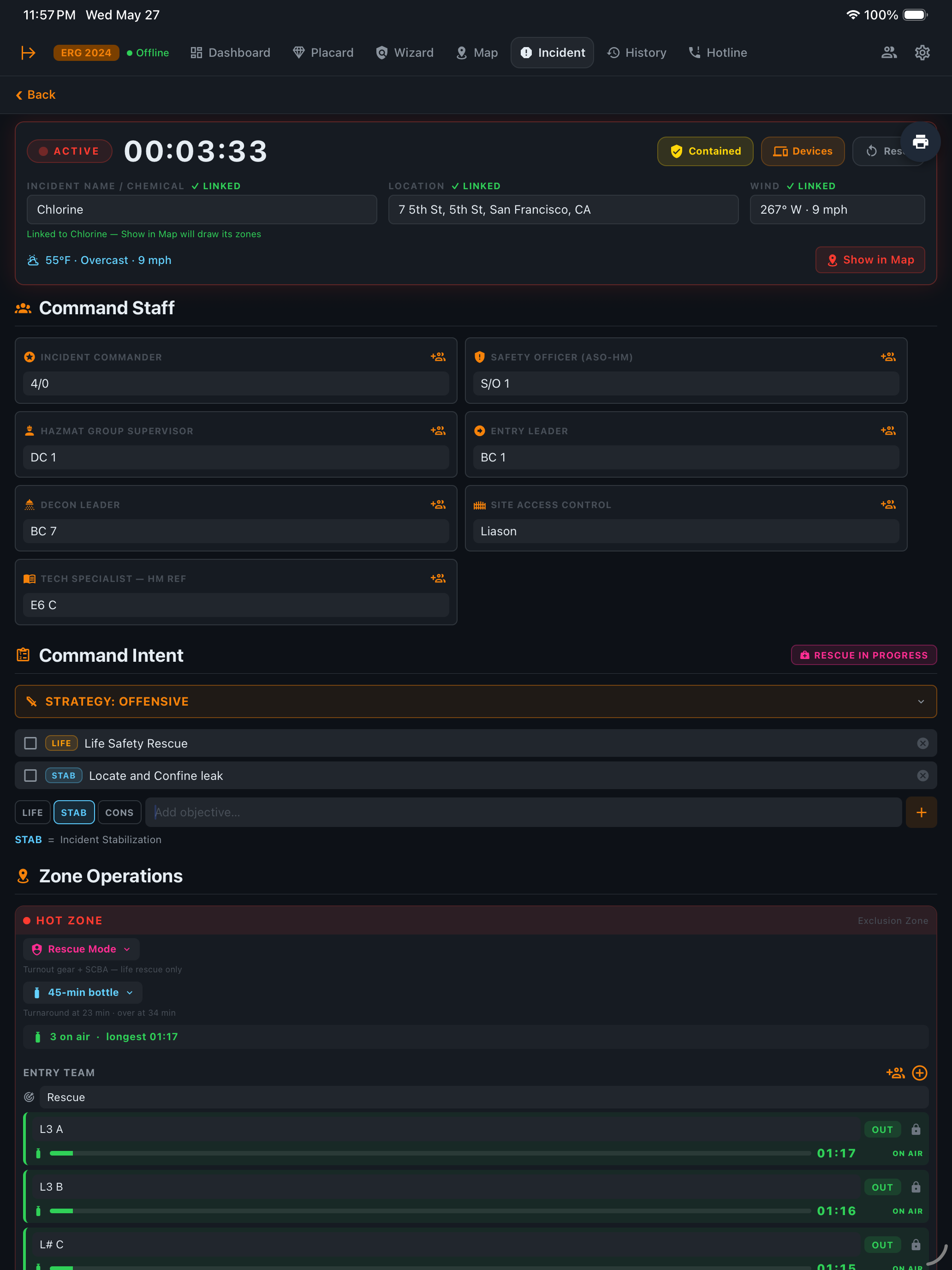
On scene, you tap the red "Activate Incident" button floating at the bottom-left of the Map. One tap captures everything — chemical name, street address (reverse-geocoded), GPS coordinates, weather conditions, wind speed and direction — and navigates directly to the Incident Command Board with all fields pre-populated. No retyping. No copying between screens.

Top — Command Structure
iPad Incident Command Board top — ACTIVE Chlorine incident at 00:03:33 with all three green linked badges (chemical, location, wind) tying the board to the live Map pin at 7th St San Francisco, full Command Staff populated (Incident Commander, Safety Officer ASO-HM, Hazmat Group Supervisor, Entry Leader, Decon Leader, Site Access Control, Tech Specialist HM REF), OFFENSIVE strategy declared with Life Safety Rescue and Locate and Confine Leak objectives, Rescue in Progress indicator visible, Hot Zone in Rescue Mode with Level A PPE plus 45-minute SCBA bottle and Entry Team L3 A B and L4 C on air with elapsed timers
Bottom — Operational Ground Truth
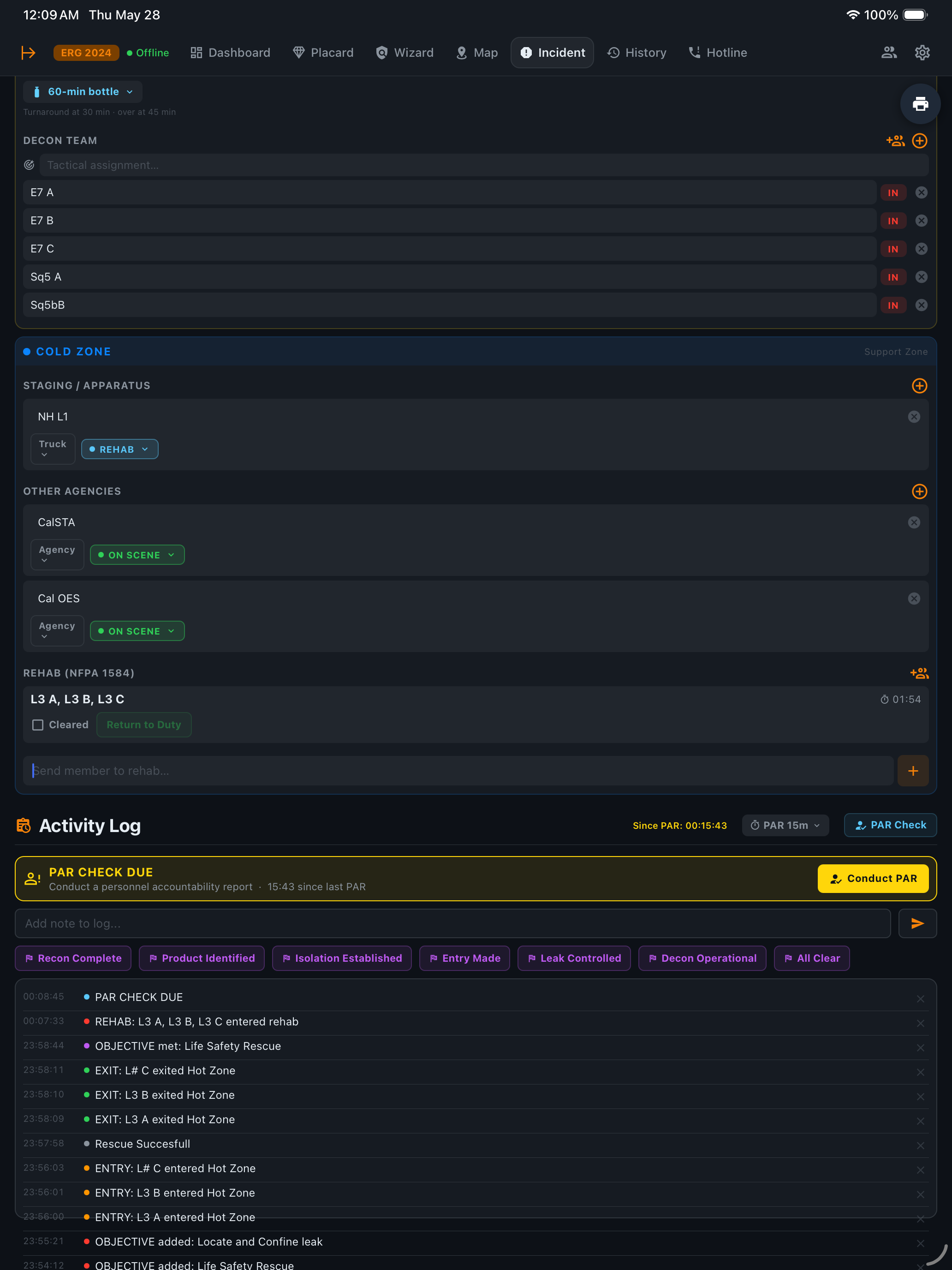
iPad Incident Command Board bottom — Decon Team E7 A B C and Sq5 A B all IN, Cold Zone with Staging NH L1 truck on REHAB plus Other Agencies CalSTA and Cal OES on scene plus NFPA 1584 Rehab tracking with L3 A B C at 01:54 and Cleared and Return to Duty controls, Activity Log with PAR CHECK DUE banner plus all seven benchmark quick-buttons (Recon Complete, Product Identified, Isolation Established, Entry Made, Leak Controlled, Decon Operational, All Clear) and a fully populated timestamped log of every entry exit rescue objective and PAR action

The Command Board is a full NIMS / ICS tactical worksheet designed for a single active incident:

🔴 HOT ZONE

PPE level selection (A–D), Entry Team with IN/OUT timestamps, two Backup Teams. Every entry and exit is auto-logged.

🟡 WARM ZONE

Decon level (Emergency → Technical → Mass), corridor status (Setting Up → Operational), decon team roster.

🔵 COLD ZONE

Staging / apparatus list, mutual-aid agencies, command post location.

The activity log captures every command decision, every entry, every PAR check, every decon event — AirPrintable as the after-action document the moment the incident closes. Every action timestamped, attributable, defensible.

Put it on the rig before the next run.

The live Map, isolation zones, and Incident Command Board you just walked through are licensed features — a department license puts your whole crew on one synced board across every iPad and desktop, with encrypted backup. Email us when you're ready to equip your department.

iPhone free · Solo iPad $299/yr · Department $500–$1,500/yr (2–10 devices · iPad + desktop) · 7-day free trial